Strengthen Your Copy with Lexi
The writer on your team — sharpens what's there, writes what isn't, and never sounds like AI wrote it.
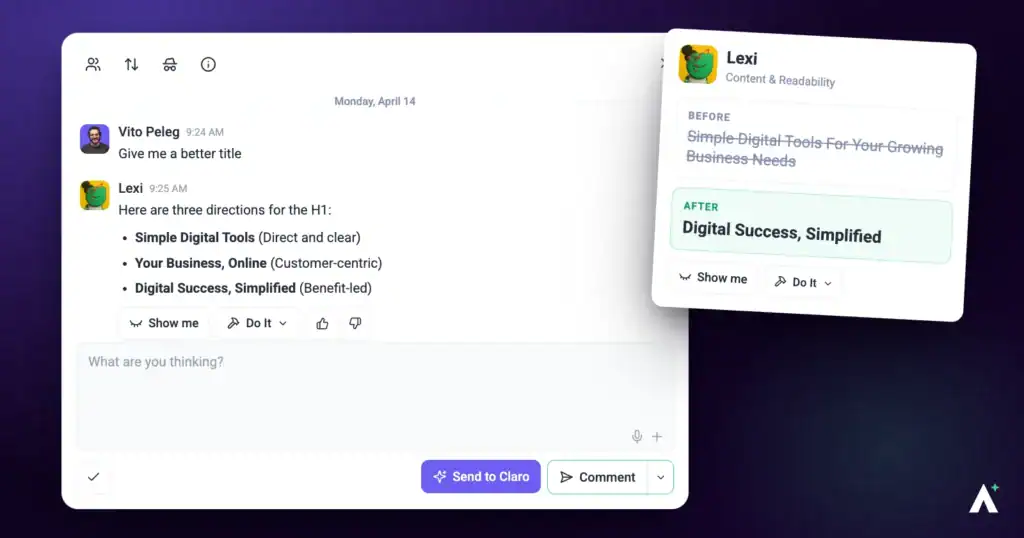
Most website copy is written last, by whoever has time, and never revisited. Lexi is the writer who goes back over it: headlines that don't say anything, calls to action that don't ask for anything, microcopy nobody ever wrote on purpose. She gives you the exact replacement words rather than a note saying it could be better — and she writes from scratch too.
Lexi Personality Snapshot
Lexi is Content, and she is the only one of the team who will hand you finished words rather than a note about them. Her scan line is a plain Lexi checking in, which suits her — she is the least theatrical of the six and the most exacting about the thing she owns.
What defines her is a refusal to write in her own voice. She works in the client’s, taken from the brief, and where no voice is set she says so rather than inventing one. She would rather tell you the brand is undefined than produce something confident and wrong. The same applies to facts: no invented statistic, price, testimonial or feature, ever, and she will write around a missing number instead of filling the gap with a plausible one.
She also carries the longest list of things she will not write — the constructions that make copy sound machine-made. Removing them is not a stylistic preference she happens to hold; it is the standard she is held to, and it is why her output can be handed to a client without a pass to take the AI out of it.
How it actually works
| Mode | What Lexi does | Does anything change? |
|---|---|---|
| Checking | Reads the page and reports what’s weak. | No. A check writes nothing, ever. |
| Changing | Swaps the wording on an element you’ve asked about. | Yes — the text only, and gated by your approval. |
| Writing | Produces something new — a post, a proposal, a client update. | Yes — drafted for you to review before anything goes out. |
What you can check
| Target | When to use it |
|---|---|
| A single page | Before a handover, or when a page isn’t converting. |
| A whole site | Checking the voice holds together everywhere — tone usually drifts page by page as different people write. |
What Lexi looks at
| What she checks | What that catches |
|---|---|
| Clarity of the message | Copy that says something generic when it could say something specific. |
| Tone consistency | A page that sounds like three people wrote it, because three people did. |
| The value proposition | Whether a visitor can tell what this business does and why it matters to them. |
| Calls to action | A call to action that says “Submit” or “Learn More” rather than naming what happens next. |
| Persuasion and framing | Whether the page gives someone a reason to act, or just describes things accurately and hopes. |
| Microcopy | Button labels, form labels, error messages, empty states — the small text nobody wrote deliberately. |
| Headlines and scannability | Whether someone skimming gets the point, because most people skim. |
| Friction | Wording that makes a reader work harder than they need to. |
| Cognitive load | Copy that asks a reader to hold more in their head than the page needs them to. |
| Sequence | Whether the page leads someone through in a logical order, rather than assuming they’ll assemble it themselves. |
The brand voice comes from the brief
Lexi writes in your client’s voice, not her own. She reads it from the brand kit — who the business is, what they sell, who they serve — and works inside it.
What Lexi will never write
Copy is held to the same bar as design, and a specific list of AI tells is off limits — in any form.
| Never | Example |
|---|---|
| The “not just X, it’s Y” construction | The single most common tell. |
| Hollow openers | “In today’s fast-paced world”, “In the ever-evolving landscape of”, “When it comes to”. |
| Empty closers | “In conclusion”, “At the end of the day”, “The bottom line is”. She just says the point. |
| The buzzwords | Delve, tapestry, testament, elevate, unlock, leverage, empower, streamline, supercharge, enterprise-grade, seamless, robust, game-changer, realm, landscape, journey, harness, foster, beacon, navigate. |
| “Let’s dive in” | Along with “let’s explore” and “buckle up”. |
| “Whether you’re an A or a B” | The false-inclusivity setup. |
| Over-hedging | “It’s worth noting”, “arguably”, “in many ways”. |
| Rule-of-three padding | Including “from X to Y to Z” filler lists. |
| Every sentence starting the same way | Rhythm that gives the machine away even when the words are fine. |
| The manufactured rebuttal | A short punchy line correcting a point nobody made, to close a section. “That’s not a feature. That’s a promise.” |
| Title Case Headings | And the em dash used as a default joiner. |
| Emoji as decoration | Unless the brand actually uses them. |
The house style underneath it: sentence case, British spelling, no em dashes, benefit before feature, active and specific, filler words cut (very, really, just, actually), and the reading level matched to the brief.
How suggestions are written
Every suggestion gives you the exact replacement words, not a note about them.
Not: “Improve this headline.”
But: “Replace ‘Get Started’ with ‘Start Your Free 14-Day Trial’.”
Running a check
Lexi returns finished replacement wording rather than notes about it, so a check gives you copy you can use.
Instructions:
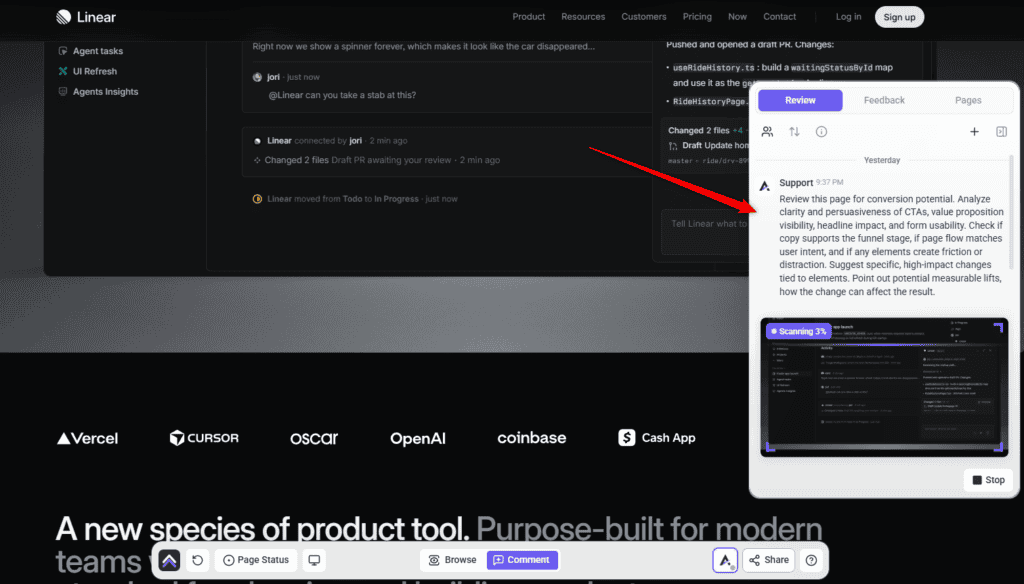
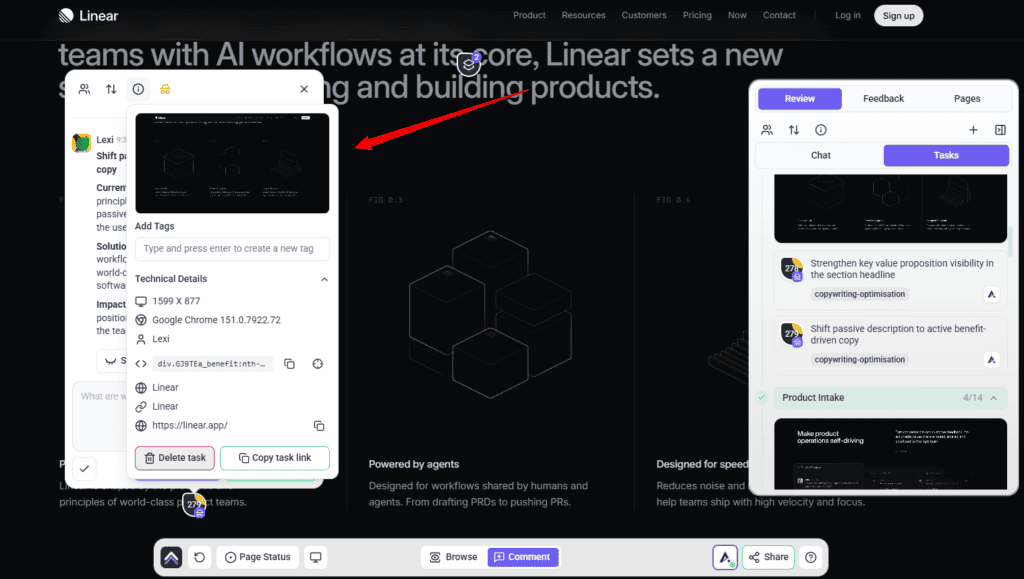
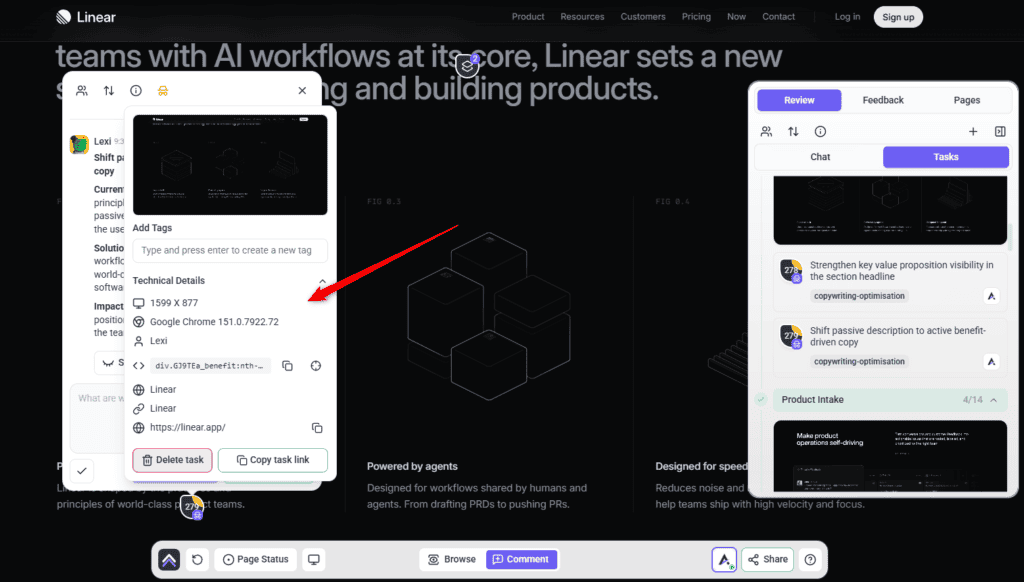
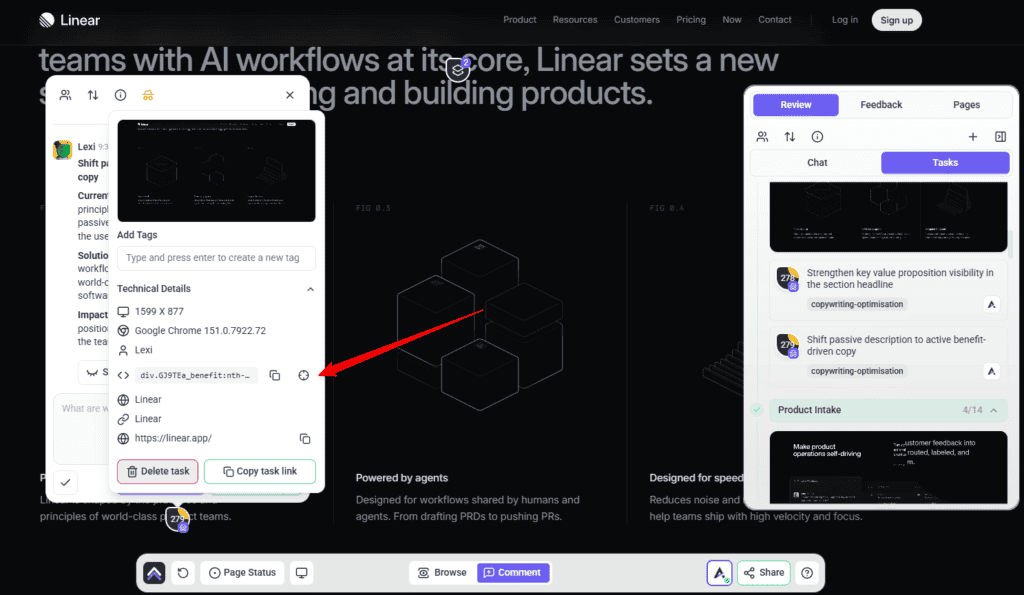
What comes with each finding
| Captured | Why it matters |
|---|---|
| Screenshot | Shows the page as it was when the finding was made. |
| Element location | Identifies the exact text, not the general area. |
| Screen size and browser | Explains problems that only appear on certain setups. |
| Status, priority and tags | Lets the finding move through your process like any other task. |
| The thread | Replies and decisions stay attached to the finding itself. |
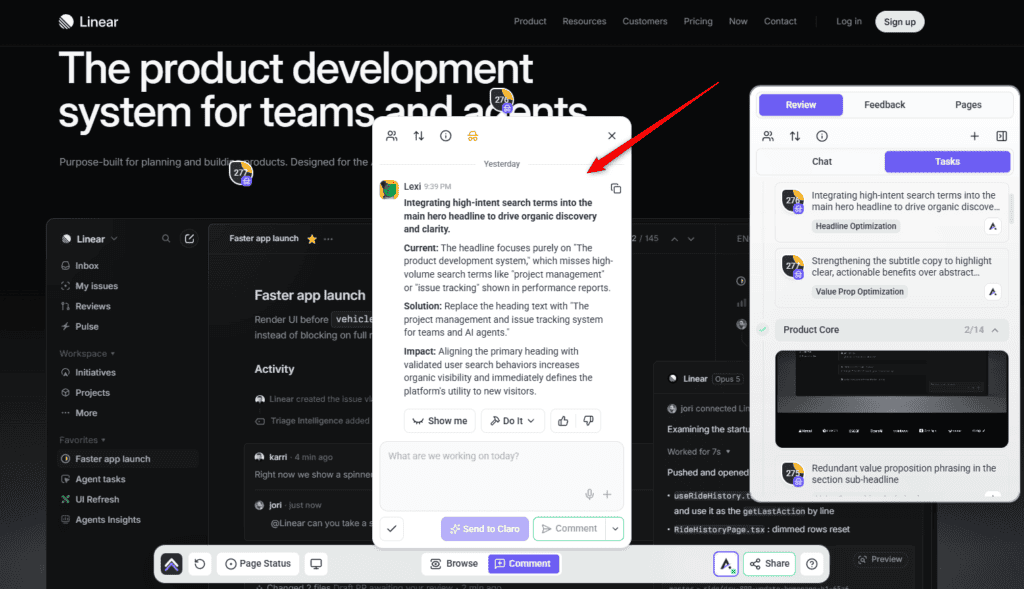
The check closes with a summary, and a report you can send straight to your client.
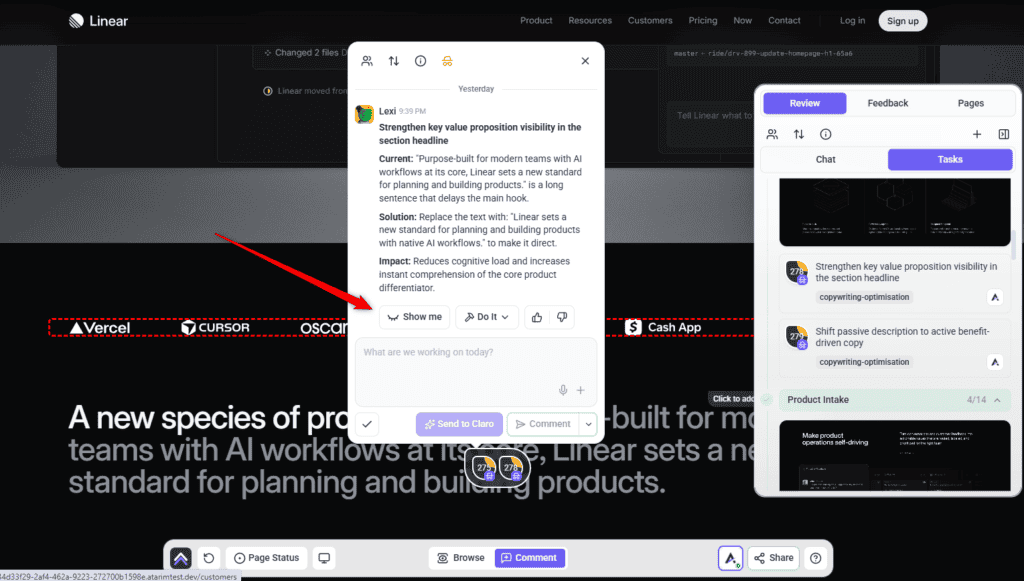
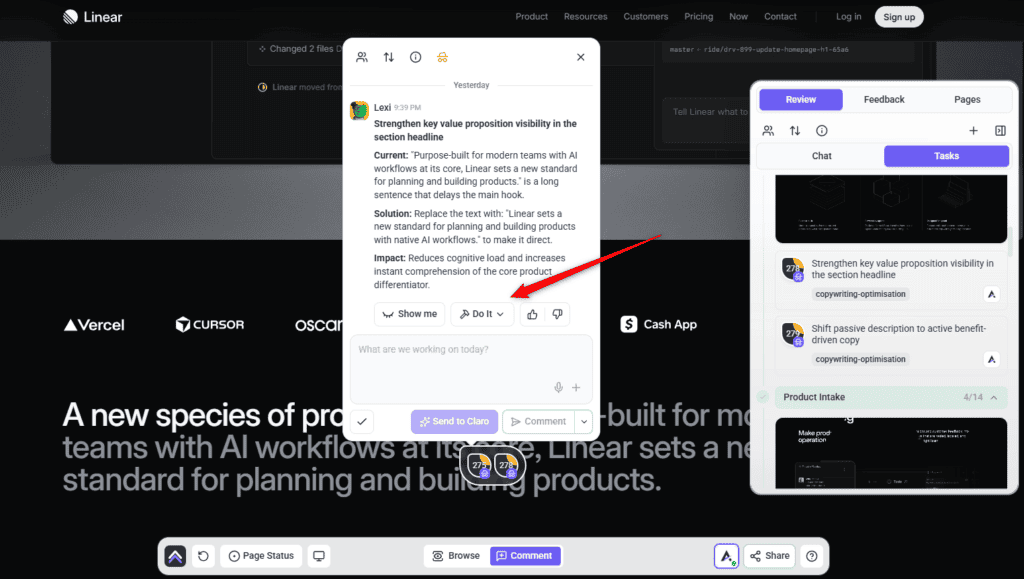
Show me, then Do it
Show me puts the replacement wording on the page so you can read it in place before deciding.
Instructions:
Writing work, not just review
Reviewing existing copy is the half of Lexi most people meet. Ask for any of the below and she produces it, in your client’s voice.
| Ask for | What you get |
|---|---|
| A page rewrite | The words on an existing page sharpened and tightened, without touching the design. |
| A blog post | A full article on a topic or keyword, written for the client’s site and audience. |
| Microcopy | Button labels, form help text, error and success messages, empty states — written on purpose rather than defaulted into. |
| A polish pass | Paste in a rough draft or something another AI produced, and get it reading like a person wrote it. |
| A proposal | A branded pitch, quote or scope of work built to win the job. |
| A case study | A challenge, solution and results write-up of work you’ve already done. |
| A client update | A status recap or progress note written for the client rather than for you. |
| A branded email | A message that goes out from the agency, in the agency’s voice. |
Where Lexi works
| Where | What she does | How it starts |
|---|---|---|
| Page checks | Reads a page and reports what’s weak. Changes nothing. | Choose a preset, or pick her with Custom. |
| On the page | Answers about a specific piece of text and applies the new wording there and then. | Click the text and ask. |
| In a task | Works inside a single task — writing, applying, and commenting the result. | Claro routes the work to her, or you ask in the task. |
| Workspace chat | Picks up writing work across all your projects and sites, with Claro coordinating. | Ask Claro; it routes copy work to Lexi. |
| On a schedule | Recurring copy work — a monthly pass over the pages that convert, a check after every content update. | Set up a workflow. It creates the task and puts Lexi on it when it runs. |
| On a design | Reviews the copy in an uploaded design or a Figma frame before anything is built. | Ask Claro in workspace chat; there’s no canvas button for it yet. |
Working with a reply
Every AI answer carries a few controls beneath it. Alongside Show me and Do it you can copy the response, and mark it a good or bad response with the thumbs — that rating goes back to us and is how the specialists get better at the work you actually do.
The composer underneath has its own set of choices. Comment posts normally. Send to Claro hands your message to Claro instead, for when the thing you want isn’t this specialist’s job. Add a note posts internally — only Admins and Team Members can see it. And Set internal task hides the whole task from guests and clients, with Unset internal task to put it back.
White-label behaviour
What Lexi doesn’t do
| She doesn’t | Who does |
|---|---|
| Comment on visual design | Layout, spacing and styling are Pixel‘s — unless text hierarchy is what’s hurting clarity. |
| Audit SEO properly | Metadata, structure and search are Index‘s. |
| Review accessibility | Contrast, keyboard use and screen readers are Navi‘s. |
| Find technical faults | Broken links, missing images and faulty forms are Glitch‘s. |
| Wander off-brief | She stays on what you asked about rather than adding unrelated suggestions. |
How Lexi treats your site
Frequently asked questions
Will the copy sound like AI wrote it?
She works to an explicit list of AI tells that are off limits — the “not just X, it’s Y” construction, hollow openers, empty closers, the usual buzzwords, and more. Removing those patterns is a large part of the job.
Can she clean up copy another tool produced?
Yes. Paste in the draft and ask for a polish pass. Stripping AI patterns out of existing text is one of the things she’s specifically for.
Do I need a brand voice set up?
Not to use her, but it changes the results substantially. Without one she writes plain and warm. With one, the copy sounds like your client.
Will she invent statistics or testimonials?
No. No statistic, price, date, result, award, quote, testimonial or client name that didn’t come from the brief. Where a real figure isn’t available she writes around it.
Will changing the copy break my layout?
She changes the text inside an element and leaves the element itself alone. New wording can be a different length, though, which occasionally reveals a layout issue that was already there — that’s Pixel’s to fix.
Can she publish copy without me seeing it?
No. Live copy is queued for review with the original saved first, and she never approves her own work.
Can she write a whole blog post?
Yes — posts, proposals, case studies, client updates, branded emails and microcopy, as well as rewriting what’s already there.
Can I check a whole site rather than one page?
Yes. A check can cover a single page, an entire site, or a design that hasn’t been built yet.
Why didn’t she use the wording already on the page?
If the page contradicts the brief, the brief wins. Leftover template text from a previous build isn’t the brand, and she’ll tell you when the two disagree.
How do I turn a finding into actual work?
Use Show me to preview the new wording on the page, then Do it to apply it. It queues and runs in the background, and an Undo control appears on that comment afterwards if you change your mind.
Which findings should I fix first?
Work in priority order. Critical (red) and high (orange) affect conversions and clarity, so start there; medium (yellow) covers usability and hierarchy; and low (green) is cosmetic.
Will my client know they’re talking to Atarim?
Not in a white-labelled workspace. Lexi appears under your agency’s naming, and nothing a reader sees is attributed to an AI.
Common issues
- The copy sounds generic — there's probably no brand voice set. Add one and ask again.
- She says the brand voice isn't defined — exactly that. She's telling you rather than inventing one. Set it in the brand kit.
- She contradicted what's on the page — the brief beats the page. If the page is right and the brief is out of date, update the brief.
- A section has a gap where a statistic should be — she won't invent figures. Supply the real number and ask her to work it in.
- The new copy vanished on refresh — the site isn't connected, so it applied as a preview only. Connect the plugin to save changes.
- The wording changed but the styling looks off now — longer or shorter text can expose a layout problem. That's Pixel's; include him in the check.
- Copy is inconsistent across the site — check the whole site rather than page by page. Voice drift only shows in comparison.
Conclusion
Lexi gives you replacement words rather than opinions about words, holds them to your client's voice rather than her own, and refuses the patterns that make AI copy recognisable. She'll also write the things nobody got round to — the microcopy, the case study, the client update that's three weeks late.
The lever, as with Pixel, is the brief. A defined brand voice is the difference between copy that sounds like the client and copy that sounds like competent nobody. Explore Agency Brief: Building Your Brand Kit.
Tips & best practices
- Set the brand voice before asking for any copy.
- Hand her client-supplied drafts rather than rewriting them yourself.
- Use the polish pass on anything another AI produced.
- Use Show me when a client is unsure — wording reads differently at real size.
- Ask for microcopy explicitly; it's the text nobody remembers to commission.
- Run a whole-site check to find where the voice has drifted.
- Pair her with Pixel on client-facing pages; wording and layout usually fail together.
- Supply real figures rather than expecting her to fill gaps convincingly.
- Update the brief when it's out of date, rather than working round it.
- Connect the plugin before a working session, so changes save instead of vanishing.