Improve SEO and Page Structure with Index
Titles, descriptions, headings and speed — the parts of search you can actually control, fixed on the page.
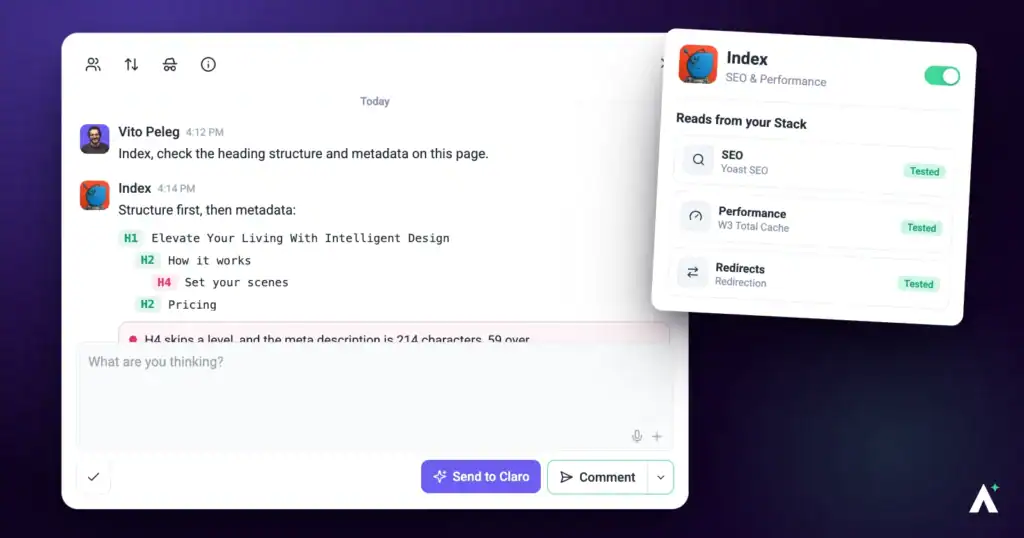
Most SEO problems on a client site aren't strategic. They're a page with no description, four H2s and no H1, a title that says “Home”, and images two megabytes larger than they need to be. Index finds those, explains why each one matters, and fixes them.
What Index can do for you
Index checks what search engines and AI answer engines read on a page, and gives you the exact text to use. This is what you get back from him:
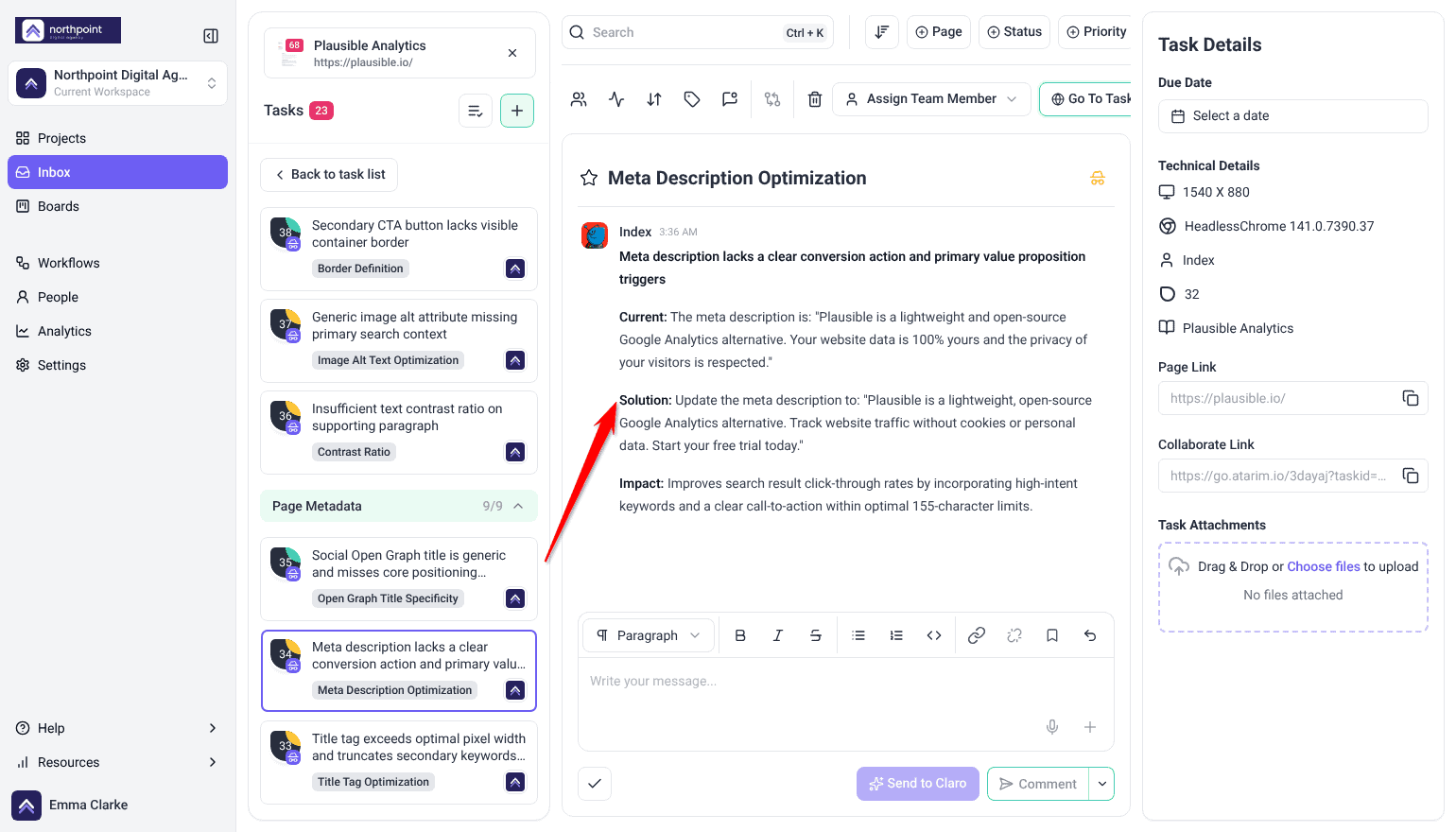
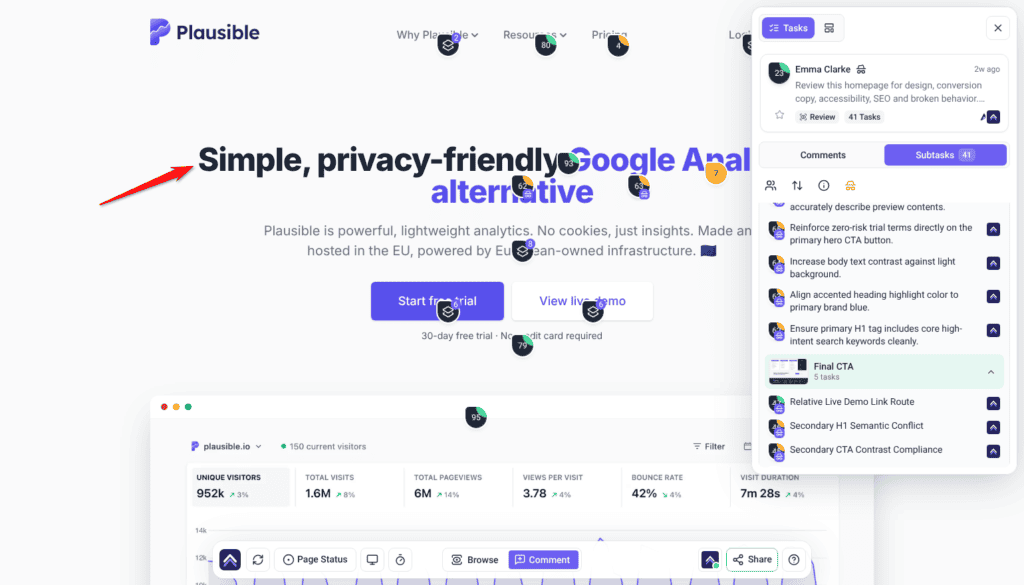
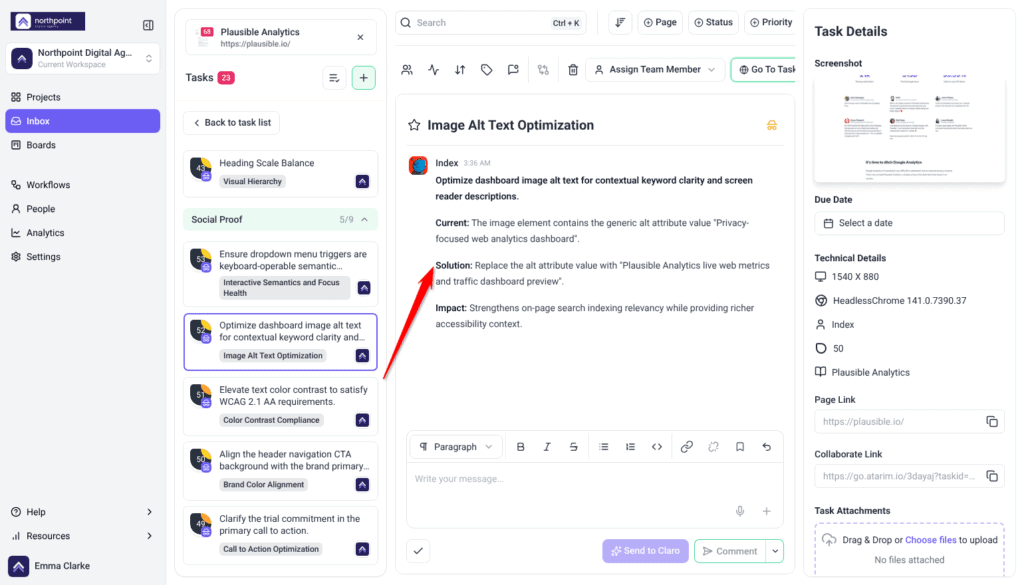
- SEO findings in a page review. One task per problem, pinned to the heading, image or link: a one-line summary, then Current, Solution (the exact new text, for example changing the heading “BEST SELLERS” to “Best-Selling Camping Tents & Outdoor Gear”) and Impact, with a priority and the device. He covers headings, alt text, internal links, keyword clarity and search intent.
- A proposed page title and meta description. His metadata pass adds page-level findings that quote the current title or description and give the one to use instead. See The metadata pass.
- Research and measurements when you ask. Search volume, keyword difficulty, competitors, backlinks and a page speed report, in a task or in workspace chat.
- The change itself. On a WordPress site connected through the Atarim plugin he writes metadata through the SEO plugin the site already uses, and Show me and Do It work on the visible parts, such as a heading or alt text. On any other site, the task holds the exact text to hand over.
Index Personality Snapshot
Index is SEO & Performance, and his temperament is closer to a librarian than a marketer. Where the rest of the team ask whether a page works, he asks whether it’s in order — sections that are labelled, headings that mean something, a structure a machine can follow. His own line when a check begins is Index here, sorting the chaos, and that’s a fair description of the job: most of what he finds isn’t broken, it’s just unlabelled.
He is the most reticent member of the team, and deliberately so. He only speaks when the check is actually about search, traffic or discoverability — he won’t add search notes to a design review because he happened to notice something. If you ran a check and heard nothing from him, that’s usually the rule working, not a fault.
He’s also the one who deals in numbers rather than impressions. Where the others describe what they see, he can measure it, and he’d rather report a real score than an opinion about speed. When he does change something he changes exactly the field in question — the description, one heading, a single alt attribute — and if putting one thing right would mean reordering the page around it, he says so and leaves the decision with you.
How it actually works
| Mode | What Index does | Does anything change? |
|---|---|---|
| Checking | Reads the page and reports what’s missing or weak. | No. A check writes nothing, ever. |
| Changing | Writes the metadata or fixes the element you’ve asked about. | Yes — scoped to that element. Your own Do It applies straight away; a change you ask the AI to apply to a published, private or scheduled page waits for your approval. |
What you can check
| Target | When to use it |
|---|---|
| A single page | Before publishing, or when one page isn’t being found. |
| More of the site | Missing titles and descriptions, which usually repeat from page to page rather than turning up on just one. A review checks the page you have open, so run one on each key page, or ask Claro in workspace chat to look across the site. |
What Index looks at
| What he checks | What that catches |
|---|---|
| Page titles and meta descriptions | Missing, duplicated, truncated, or written for nobody. |
| Heading structure | No H1, several H1s, levels skipped, headings used for styling rather than structure. |
| Keyword clarity | Whether the page’s actual topic is visible and supported, rather than implied. |
| Search intent | Whether the page answers what someone searching for it actually wants. |
| Internal linking | Pages that sit isolated, and obvious links that were never made. |
| Structure for crawling | Content organised so it can be read by a machine as well as a person. |
| Image alt text | Missing alt attributes where they’re visible on the page. |
| Being cited by AI search | Sometimes called GEO, or generative engine optimisation: whether the page is structured so an AI answer engine can quote it — clear claims, real structure, and answers close to the questions people ask. He can now measure this as well as advise on it: which pages Google’s AI Overview cites for a search and the exact text it quotes, which sites ChatGPT names for a brand or a search, and what ChatGPT answers along with the sources behind that answer. |
| Speed | Measured, not guessed — see below. |
The metadata pass
Index has a check of his own alongside the visual one. Where a page’s metadata is captured with it, that’s reviewed as a separate pass — the fields that never appear on screen but decide how the page shows up in search and when it’s shared.
Each metadata finding is a page-level task rather than one pinned to an element. It quotes the current page title, meta description or other tag under Current, and gives the exact replacement under Solution, for example a title that adds the page’s main product terms after the brand name.
He measures rather than estimates
A check doesn’t judge speed by eye. Real measurement can run at the overview level, alongside the read of the page, when it’s relevant to what you asked, and feeds what Index reports.
| Measurement | What it tells you |
|---|---|
| Page speed report | A real performance score for the page, from a proper test rather than an impression — including how quickly it loads and settles for a visitor. |
| Keyword trends | Whether a term is rising or falling, so you’re aiming at where demand is going. |
| Accessibility report | Can also run at overview level, though acting on it is Navi’s job rather than his. |
| Rank history | Where a domain ranked month by month, as one dated series going back up to two years — so a report can show movement without you having kept the earlier one. |
| AI visibility | How often a brand or domain is named in AI answers, and which sources those answers lean on. No coverage is reported as zero rather than estimated: for most small and local sites, zero is the true answer. |
Two things worth knowing before reading a result. AI Overview citations are not counted unless they are asked for, so a report that never requested them says nothing about whether they exist. And one row is one placement, not one keyword: a page that both ranks and is cited appears twice.
Research before he changes anything
Index doesn’t guess at demand. Ask him about a term, a competitor or a market and he looks it up against live search data, then uses what comes back to decide what the page should say. The order is always the same: research, then a recommendation you can see the reasoning behind, then the change.
| What he can look up | What it tells you |
|---|---|
| Keywords | Search volume, how hard a term is to rank for, an overview of it, related ideas, and what someone searching it actually wants. |
| Trends | Whether terms are rising, stable or falling against each other over the past year. |
| Live results | What is actually ranking for a term right now. |
| Competitors | Who else ranks for your terms, what else they rank for, and the gap between their keywords and yours. |
| Domains | An overview of a domain, and the keywords it already ranks for. |
| Backlinks | A backlink profile, and the referring domains behind it. |
| Pages | An on-page audit — titles, headings, canonical and markup — and the content a given URL actually contains. Crawling and indexing sit outside it; those need the site’s Search Console. |
| Local | Business listings for a place, so local work is checked against real listings rather than assumptions. |
It’s the same set of lookups wherever you ask — in workspace chat, inside a task, or on the page itself. Each lookup uses credits. Speed reports and keyword trends are free, most other lookups cost 1 to 5 credits, and search volume costs 25 credits a request.
How to ask for it
Index takes plain requests. These are the ones that do the most work:
| What you want | Ask for it like this |
|---|---|
| A starting position | “Baseline our search position for example.com in the UK — what we rank for, roughly what that traffic is worth, and how many referring domains we have.” |
| The fastest wins | “Which terms is example.com already ranking between 4th and 20th for in the UK?” |
| Who you’re really up against | “Who actually competes with example.com in UK search, and which of their keywords do we not rank for?” |
| Whether a term is worth chasing | “For these terms — [list] — give me the volume, the difficulty, and how many referring domains sit behind the pages already ranking. Then tell me which we could realistically win.” |
| A content plan | “Group these keywords by intent and map each group to a single page on example.com.” |
| What a page needs | “Audit https://example.com/services — titles, headings, canonical, markup, and what the page actually says.” |
| Ideas straight from the results | “Show me the live UK results for ‘garden rooms’, including the People Also Ask questions.” |
| Local consistency | “Check our business listings against what the site says, for our Bristol address.” |
instawp.site address, a -staging subdomain, anything that isn’t the business’s own name. A copy has no search history, no links and no rankings of its own, so a baseline taken from one describes the copy rather than the client. Before measuring, Index looks for the business’s own domain in the footer, the contact address and your brief, and his reply starts by naming the domain he measured. If nothing names a live domain, he measures the project’s address, says it isn’t the business’s own, and asks you for the live domain so he can measure that. An on-page audit is the exception: the markup is the same either way.
GB or United Kingdom, US or United States. Shorthand isn’t recognised, so UK and USA come back asking for the market again rather than running. Without a market named at all, some of these lookups can’t run either.
Working with your SEO plugin
Metadata is written through whichever SEO plugin the site already uses, rather than adding another layer.
| Plugin | What he can set |
|---|---|
| Yoast SEO | SEO title, meta description, focus keyphrase, canonical and indexing settings. |
| Rank Math | SEO title, meta description, focus keyphrase, index and noindex settings. |
| All in One SEO | SEO title, meta description, focus keyphrase, canonical and indexing settings. |
Site-wide settings, one at a time
The table above is per page. Index can also change a plugin’s site-wide settings — the templates and defaults that apply across the whole site rather than to a single URL.
| Plugin | What he can set site-wide |
|---|---|
| Yoast SEO | The homepage title and description, the separator character, and whether the site presents itself as a company or a person. Title and meta templates for individual post types and taxonomies can be written too, though those he cannot read back to confirm. |
| Rank Math | The same defaults. Its redirections and module switches are the exception — nothing reaches them directly, so they take the slower route described below, and Rank Math’s Redirections module stays off until someone turns it on. |
| All in One SEO | Site title and description, the separator, and the site-wide defaults behind them. |
- One named change per request. He won’t bundle several together.
- Only on something you typed. He won’t make a site-wide change during an automated run. On a scheduled workflow he reads the current values, reports them, and tells you to make the edit in the plugin’s own settings.
- Approval first. He says what the change will do, then waits for you.
- Read back afterwards. He re-reads the value from the plugin to confirm it saved, rather than assuming the write worked.
Show me and Do It
Ask Index about an element on the page and, where he proposes a change, you get Show me and Do It beneath his answer. Show me applies it to the page in front of you; you can toggle it off and back on to compare, regenerate it if it isn’t what you meant, and take a screenshot straight into the thread as a comment. Do It applies it for real, queuing and running in the background, and an Undo control then appears on that comment. Once it has applied, the task moves to Pending Review.
Speed, images and caching
Performance sits in his remit, but it works differently from metadata. Metadata he writes directly. Speed work runs through the plugins that own it — a caching plugin, an image optimiser, a database cleaner — and what he can do depends on where each setting lives.
| Area | What actually happens |
|---|---|
| Image weight | He’ll identify oversized images and can set up an optimiser, including its stored settings. Where the site uses ShortPixel, EWWW, Smush or reSmush.it, he can also run the compression: one image, a set, or every image not yet compressed. Entering the account key and choosing how WebP or AVIF get delivered stay with you in the plugin’s own screens. |
| Caching | He’ll tell you what’s active and what’s missing, and can install a caching plugin. He can clear the site’s cache himself: all of it, or a single page where the caching plugin supports that. Its settings live in the plugin’s own storage rather than in ordinary site settings, so configuring the cache is guided rather than done for you. |
| Database | He can install a maintenance plugin and configure the cleanup and its schedule. The cleanup itself is something the plugin performs on that schedule — it isn’t a button he can press. |
| Redirects | Where your SEO plugin manages redirects, he can create them directly. Where a standalone redirect plugin owns them, the rules live in its own tables and he’ll guide you through adding them instead. |
Running a check
Index joins a review when search is named as the goal. A review reads what is on the page — the keyword and competitor research is a separate ask, in chat or on a task.
Instructions:
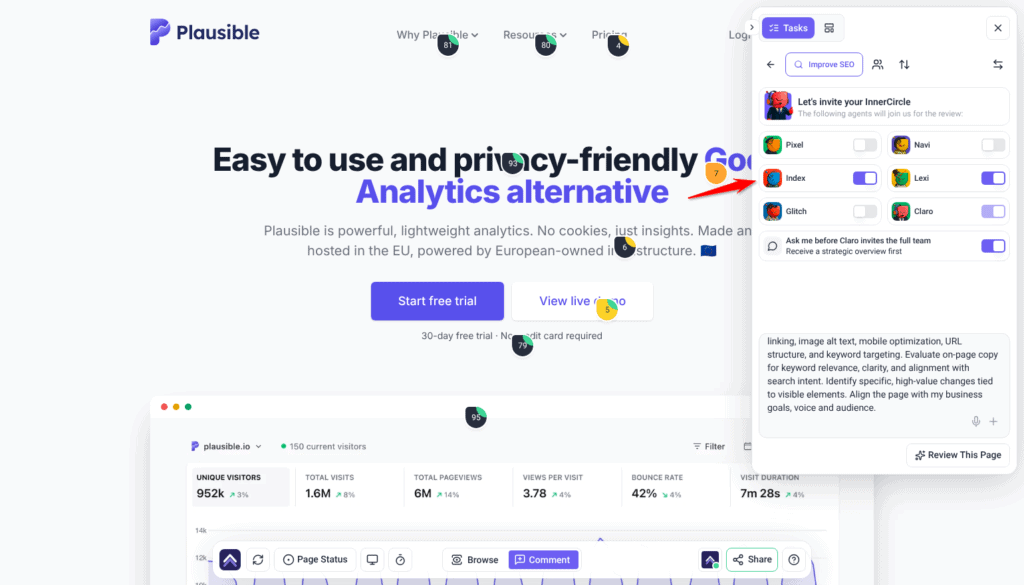
- Open the page from Projects, then open the Review tab in the sidebar.
- Choose the preset that matches your goal for the page — each one carries its own set of specialists — or switch to Custom to write your own prompt and pick the specialists yourself. Make this page faster and Improve SEO bring Index in. A preset fills in the description and replaces anything already typed there.
- On Let’s invite your InnerCircle, check that Index’s switch is on. The preset sets the switches, you can turn any specialist on or off, and Claro’s switch always stays on.
- Edit the description if you need to. Improve SEO already asks for metadata, headings, alt text and keywords; with Custom, say that search or discoverability is what you’re checking, because he stays out of reviews that aren’t about it.
- Select Review This Page. Claro posts a Strategic Overview first. Select Start Review under Ready to include the InnerCircle? to bring the specialists in. The findings are listed under Tasks in the Review tab, grouped by section of the page, each signed by the specialist who raised it.
What comes with each finding
| Captured | Why it matters |
|---|---|
| Screenshot | Shows the page as it was when the finding was made. |
| Element location | Identifies the exact heading, image or field. |
| Screen size and browser | Explains problems that only appear on certain setups. |
| Status, priority and tags | Lets the finding move through your process like any other task. |
| The thread | Replies and decisions stay attached to the finding itself. |
The check closes with a summary, and a report you can send straight to your client — useful on a care plan, where SEO maintenance is otherwise invisible work.
Where Index works
| Where | What he does | How it starts |
|---|---|---|
| Page checks | Reads a page and reports what’s missing. Changes nothing. | Choose a preset, or pick him with Custom. |
| On the page | Answers about a specific heading or image and applies the fix there and then. | Click the element and ask. |
| In a task | Works inside a single task — fixing, and commenting the result. | Claro routes the work to him, or you ask in the task. |
| Workspace chat | Picks up SEO and speed work across all your projects and sites. | Ask Claro; it routes search and performance work to Index. |
| On a schedule | Recurring SEO work — a monthly metadata sweep, a post-update check — without anyone starting it. | Set up a workflow. It creates the task and puts Index on it when it runs. |
Working with a reply
Every AI answer carries a few controls beneath it. Alongside Show me and Do It you can copy the response, and mark it a good or bad response with the thumbs — that rating goes back to us and is how the specialists get better at the work you actually do.
The composer underneath has a Send to Claro button beside a Comment / Add a note split button. Comment posts normally. Send to Claro brings the AI in, and whichever specialist the work belongs to is the one who answers. Add a note posts internally — only Admins and Team Members can see it. To hide the whole task from guests and clients, select the internal icon at the top of the task (its tooltip reads Set internal task). Select it again to undo.
White-label behaviour
What Index doesn’t do
| He doesn’t | Who does |
|---|---|
| Judge how it looks | Layout, spacing and styling are Pixel‘s. |
| Rewrite persuasive copy | Messaging, tone and calls to action are Lexi‘s. He writes metadata, not sales copy. |
| Find technical faults | Broken links, missing images and faulty forms are Glitch‘s. |
| Audit accessibility | Contrast, keyboard use and screen readers are Navi‘s. |
| Go out and earn links | He’ll show you a competitor’s backlink profile and the domains linking to them. Outreach, and actually getting a link, stays with you. |
How Index treats your site
- One element at a time. A weak meta description means the description is replaced. Not the title, not the headings, not the body copy alongside it.
- Big restructures are raised, not made. If fixing the heading logic would mean reordering whole sections, he recommends it rather than doing it.
- Your live page stays up. He won’t unpublish, rename, re-address or bin a page.
- Approval before it lands. Changes needing your sign-off wait for you. A request nobody decides on within 14 days is declined automatically, and nothing runs.
Frequently asked questions
Does he cover being found by AI search?
Yes, as part of on-page fundamentals. Clear claims, real heading structure and answers placed close to the questions they address are what let an answer engine quote a page — and they help traditional search too.
Does Index do SEO strategy?
He does the research a strategy is built on, but not the strategy itself. He’ll pull search volume, keyword difficulty, competitor rankings and backlink profiles, and he covers what’s on the page — titles, descriptions, headings, structure, internal links, alt text and speed. Deciding what to publish, and going out to earn links, stays with you.
Why didn’t he say anything in my review?
He only contributes when the check is about search, traffic or discoverability, so he doesn’t add SEO notes to a design review. Ask for a search check, or select him directly.
Does he need an SEO plugin installed?
Not to review a page. To write metadata directly he works through whichever plugin the site already uses — Yoast, Rank Math or All in One SEO.
Does he actually measure speed, or estimate it?
He measures it. When speed is relevant to what you asked for, Claro runs a real page speed report during the check, rather than speed being judged by impression.
Can he make my site faster?
He can measure it, tell you exactly what’s making it slow, and set up the plugins that fix it — an image optimiser, a caching plugin, a database cleaner — including their settings. He can also compress images and clear the cache himself. The database cleaner still runs its cleanup on its own schedule. Hosting and theme quality sit outside his reach entirely.
Who handles alt text, him or Navi?
Both care about it. He treats it as search and structure; Navi treats it as accessibility. Fixing it once satisfies both.
Will he restructure my headings?
He’ll fix a single heading. If proper logic would mean reordering whole sections, he raises it as a recommendation and leaves the decision with you.
Can I check more than one page?
A review checks the page you have open. To cover more of a site, run a review on each page that matters, or ask Claro in workspace chat to look across the site. It’s worth checking your key pages, because missing titles and descriptions almost always repeat across pages.
Will my rankings improve?
Fixing what’s on the page removes the obvious obstacles. Where you rank also depends on competition, links and content depth, none of which are on-page issues.
How do I turn a finding into actual work?
Use Show me to preview the change on the page, then Do It to apply it. It queues and runs in the background, and an Undo control appears on that comment afterwards if you change your mind.
Which findings should I fix first?
Work in priority order. Critical (red) and high (orange) affect conversions and clarity, so start there; medium (yellow) covers usability and hierarchy; and low (green) is cosmetic.
Common issues
- No SEO findings came back — he stays out of checks that aren't about search. Say discoverability is what you're checking, or pick him yourself with Custom.
- Nothing came back about metadata — the metadata pass needs Index in the check and the page's metadata captured with it.
- Metadata changes won't save — check the site has an SEO plugin he can write through, and that it's on WordPress 6.9 or later with the plugin connected.
- He recommended a heading change instead of making it — fixing it would have meant restructuring other sections. That's raised rather than done, so you decide.
- Rankings haven't moved — he fixes what's on the page. Rankings also depend on competition, links and content depth, which sit outside what he covers.
- The speed score didn't improve much — check image weight first. It's usually the largest single factor, and caching won't compensate for an oversized hero.
- A page stopped ranking after a URL change — a redirect was probably missed. Set one up from the old address to the new one.
- Alt text wasn't flagged — neither Index nor Navi was in the check. Either one covers it.
Conclusion
Index handles the part of SEO that's unglamorous, repetitive, and genuinely worth doing: the missing description, the page with no H1, the image nobody compressed. He measures rather than guesses, writes through the SEO plugin you already have, and fixes one thing at a time.
He's most useful across a site's key pages rather than a single one. That's where the gaps show up as a pattern, and where a before-and-after report turns invisible maintenance into something a client can see they paid for. Explore How to Run an AI-Powered Page Review.
Tips & best practices
- Review your key pages, not just one; metadata gaps come in bulk.
- Structure pages so an answer engine can quote them; it serves normal search too.
- Say search is what you're checking, or he stays out of it.
- Take a speed measurement before the work, so the after has something to sit against.
- Start with image weight; it's usually the biggest single win.
- Handle redirects as part of any URL change, never afterwards.
- Send the report to care-plan clients — SEO maintenance is otherwise invisible.
- Include him or Navi when you want alt text checked — either one covers it.
- Pair him with Lexi when the metadata needs to persuade as well as describe.
- Re-run after a round of fixes to confirm what actually landed.
- Don't expect ranking changes from on-page work alone.